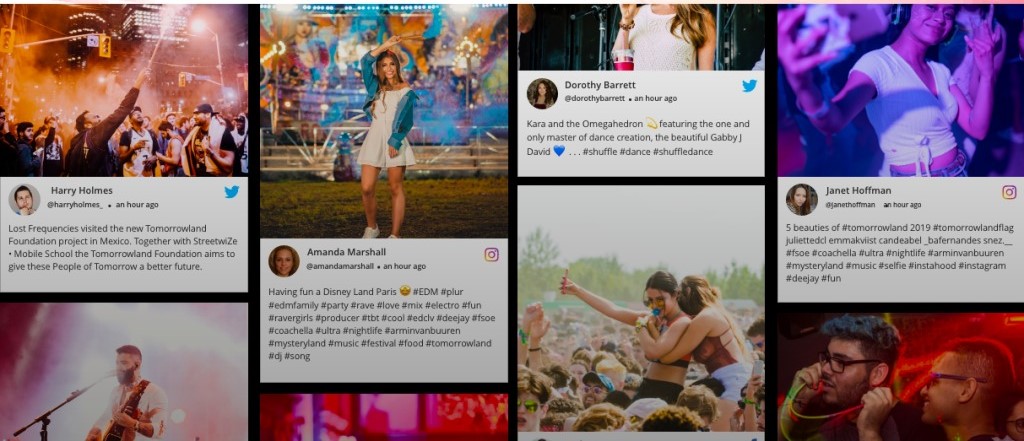
In today’s digital age, staying connected with your audience in real-time can significantly improve engagement and trust. A live Twitter feed offers a dynamic way to showcase your brand’s presence, provide social proof, and enhance real-time interactions with users.
Whether you’re looking to display live updates at an event or embed a feed on your website, incorporating a live Twitter feed can help drive conversions and create a more authentic brand experience. In this article, we will explore the benefits, features, and strategies for integrating a Twitter live feed into your business marketing efforts.
What is a Twitter Live Feed?
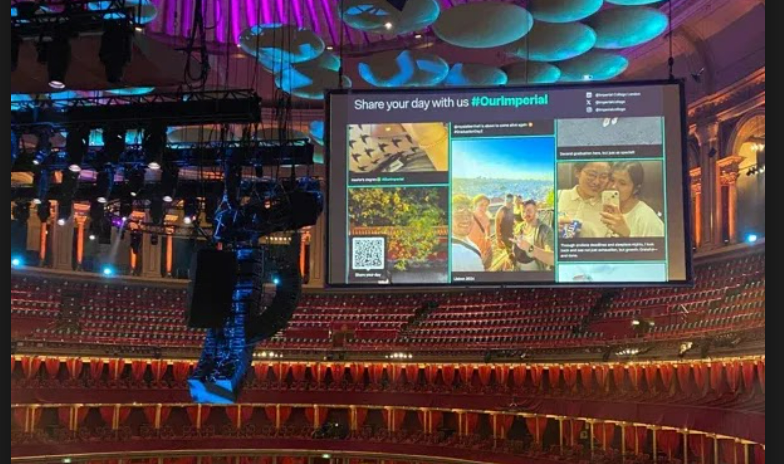
A Twitter live feed is a real-time display of selected tweets shown on websites or digital screens. These feeds are updated automatically and offer a dynamic way to feature content like hashtags, user-generated content, and more. By embedding a Twitter wall on your site or event screens, you not only provide fresh and relevant content but also foster a more interactive and engaging experience.
Why is a Live Twitter Feed Essential for Your Brand?
Live Twitter feeds offer an engaging, real-time connection to your audience. This real-time interaction enhances the transparency and authenticity of your brand, helping you stay ahead in the crowded digital space. Displaying live tweets, updates, and user-generated content builds trust and creates a meaningful connection with your audience.
Key Benefits of Embedding a Live Twitter Feed
Embedding a live Twitter feed can truly transform your online and event experience, making your content more interactive, authentic, and engaging for your audience.
- Engage with Real-Time Content: A Twitter wall brings your website or event screens to life, displaying live content that updates automatically, keeping everything fresh and engaging.
- Build Trust with Social Proof: Featuring positive customer tweets, reviews, and testimonials on your Twitter wall boosts credibility. The power of user-generated content establishes social proof that helps potential customers trust your brand.
- Increase Engagement and Interaction: Whether on your website or at an event, a live Twitter feed encourages your audience to participate in conversations, share their thoughts, and even follow your Twitter account.
How to Use Live Twitter Features for Your Business
There are several ways to utilize Twitter’s live features for your business:
- Live Tweeting: Share real-time updates, insights, and news that keep your audience engaged and informed.
- Twitter Spaces: Host live audio discussions to engage your audience on a more personal level and establish thought leadership.
- Twitter Live Video: Show live events, behind-the-scenes content, or product demos to give your audience an authentic, real-time experience.
- Polls and Q&A Sessions: Interactive Twitter features like polls and Q&As are excellent tools for engaging your audience and gathering valuable feedback.
- Geolocation for Events: Use Twitter’s geolocation feature to enhance event-specific engagement, bringing together both in-person and online participants.
Real-World Use Cases for Live Twitter Feeds
Here are a few ways different industries can use live Twitter feeds to drive engagement:
- Sports Events: Display live tweets from fans and athletes, making the event experience more engaging and exciting for spectators.
- Concerts & Festivals: Showcase real-time content from attendees, giving your audience a sense of connection and excitement.
- E-Commerce Websites: Integrate a live Twitter hashtag feed to feature user-generated content, reviews, and product promotions, adding credibility to your website.
- Corporate Events and Conferences: Use a Twitter wall to encourage participation and showcase real-time updates from speakers and attendees.
How to Display a Live Twitter Feed on Your Website or Event Screens
Integrating a live Twitter feed on your website or event screen is simple. Follow these four steps to get started:
- Automatically Collect Tweets: Select relevant hashtags or accounts to automatically gather tweets for your feed.
- Moderate Your Feed: Choose between auto-publishing tweets or moderating them before they go live. This ensures content quality and relevance.
- Design Your Layout: Pick from customizable layout options—grid, social wall, carousel, or slideshow—that match your brand’s style.
- Embed the Feed: Once your feed is set up, embed it on your website or display it at your event. The live feed will automatically update with new content.
Key Features to Look for in a Live Twitter Feed Platform
When choosing a platform to display your live Twitter feed, consider the following features:
- Customizable Layouts: Choose from various layouts such as grid, carousel, or social wall to match your branding.
- Real-Time Updates: Ensure your feed updates automatically, keeping the content fresh and engaging.
- Moderation Options: Decide whether to display tweets instantly or review them before posting.
- Cross-Platform Support: Look for a platform that allows you to embed your Twitter live feed across websites, event screens, and digital signage.
Conclusion
Integrating a live Twitter feed into your website or event screens offers a powerful way to engage your audience, build trust, and boost conversions. By showcasing real-time content, you create an authentic, interactive experience that keeps your brand front and center. Whether it’s for an event, a website, or a product launch, a Twitter wall offers an easy yet impactful way to connect with your audience and make your brand more dynamic.
 Social Media Wall
Leave a comment