
Your website is often the first impression users have of your brand—but static pages alone are no longer enough to capture attention. Today’s users expect dynamic, visual, and authentic content, and that’s exactly where adding an Instagram feed on your website makes a difference.
From showcasing real customer experiences to creating visually engaging galleries, brands are increasingly using Instagram feed on website examples as inspiration to improve design and engagement. When done right, embedding Instagram feeds can transform your website into a living, interactive experience.
In this guide, we’ll explore some of the best Instagram feed examples on websites, why they work, and how you can use them to inspire your own design strategy.
Why Add Instagram Feed on Your Website?
Create a Dynamic Website Experience
Embedding Instagram reels or feeds ensures your website is always updated with fresh content.
Build Trust with Real Content
User-generated content helps establish authenticity and credibility.
Improve Engagement
Visual content encourages users to explore and interact with your website.
Enhance Website Design
Instagram feeds add a modern and visually appealing section to any page.
Best Instagram Feed on Website Examples to Inspire Your Design
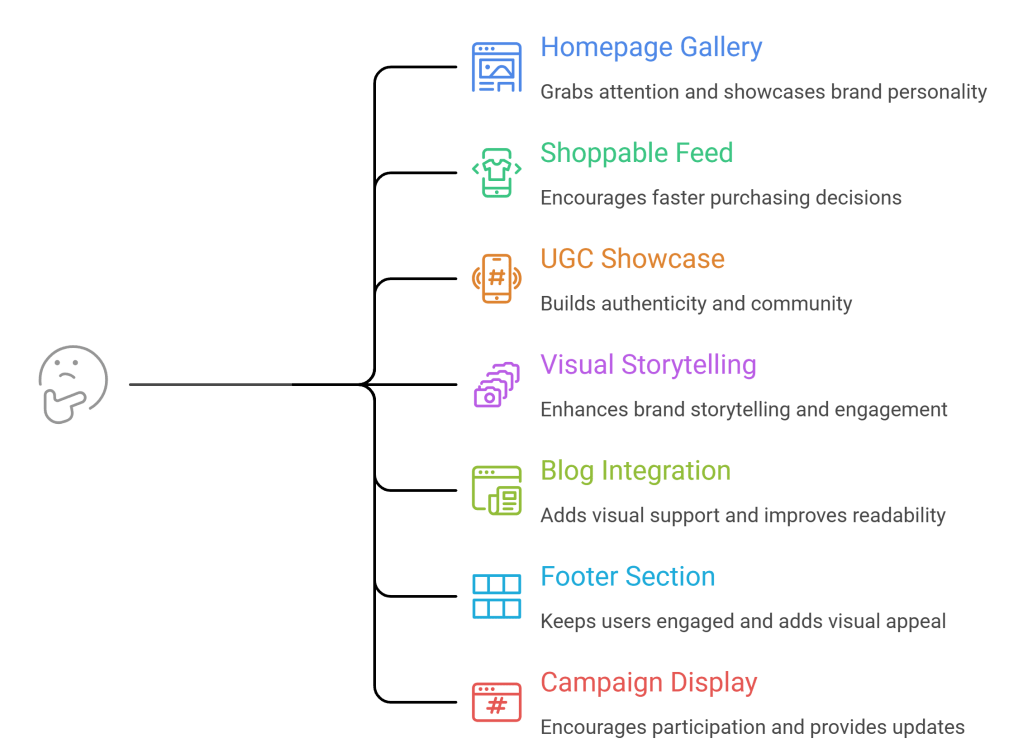
1. Homepage Instagram Gallery
One of the most common and effective Instagram feed on website examples is placing a clean grid gallery directly on the homepage.
Why It Works
- Instantly grabs user attention
- Showcases brand personality
- Keeps homepage visually fresh
How to Use This Idea
Embed a grid-style Instagram feed at the bottom or mid-section of your homepage. Use consistent branding and spacing to maintain a clean design.
2. Shoppable Instagram Feed on Product Pages
Many eCommerce brands embed Instagram feeds directly on product pages to create a shoppable experience using an Instagram aggregator.
Why It Works
- Shows real-life product usage
- Builds trust with social proof
- Encourages faster purchasing decisions
How to Use This Idea
Add a carousel or gallery of Instagram posts featuring your products, and link them to product pages.
3. User-Generated Content (UGC) Showcase
Displaying customer photos using hashtags or mentions is one of the most powerful Instagram feed examples for websites.
Why It Works
- Builds authenticity
- Encourages community participation
- Strengthens brand trust
How to Use This Idea
Create a dedicated section or page highlighting customer content collected from Instagram hashtags.
4. Instagram Feed as a Visual Storytelling Section
Some brands use Instagram feeds to tell their story visually through curated posts.
Why It Works
- Enhances brand storytelling
- Creates emotional connection
- Makes content more engaging
How to Use This Idea
Curate specific posts and display them in a slider or collage format to guide users through your brand journey.
5. Instagram Feed in Blog Pages
Embedding Instagram feeds within blog content is a growing trend among content-driven websites.
Why It Works
- Adds visual support to written content
- Improves user engagement
- Breaks text-heavy sections
How to Use This Idea
Insert an Instagram feed widget between sections of your blog to enhance readability and interaction.
6. Instagram Feed Footer Section
Many websites add a simple Instagram feed in the footer as a subtle design element.
Why It Works
- Keeps users engaged till the end of the page
- Adds visual appeal without distraction
- Encourages social media exploration
How to Use This Idea
Use a minimal grid layout in the footer with clickable posts linking to your Instagram profile.
7. Campaign-Based Instagram Feed Displays
Brands running campaigns often embed hashtag-based Instagram feeds on landing pages.
Why It Works
- Encourages user participation
- Creates a sense of community
- Provides real-time campaign updates
How to Use This Idea
Display a live Instagram feed based on a campaign hashtag to showcase user participation.
How to Create Your Own Instagram Feed on Website
To implement these Instagram feed on website examples, follow these simple steps:
- Choose an Instagram feed tool
- Connect your Instagram account or hashtag source
- Curate and moderate your content
- Customize your layout (grid, carousel, slider)
- Embed the feed on your website
This allows you to embed Instagram feed on websites without complex development.
Best Practices for Using Instagram Feed on Website
Keep Design Consistent
Ensure your Instagram feed matches your website’s branding and layout.
Use High-Quality Content
Only display visually appealing and relevant posts.
Avoid Overloading the Page
Use Instagram feeds strategically without cluttering your design.
Leverage User-Generated Content
UGC builds trust and improves engagement.
Optimize for Mobile
Ensure your Instagram feed is responsive across all devices.
Conclusion
Adding Instagram to your website is more than a design choice—it’s a strategy to create a dynamic, engaging, and trust-driven experience.
By exploring these Instagram feed on website examples, you can find inspiration to design a feed that not only looks great but also delivers real results. Whether it’s a homepage gallery, shoppable feed, or UGC showcase, the right implementation can significantly enhance your website’s performance.
If you’re planning to embed Instagram feed on your website, focus on creativity, consistency, and user experience to get the best results.
FAQs
What are Instagram feeds on website examples?
These are real implementations where websites display Instagram content in different formats like galleries, sliders, or UGC sections.
Can I embed Instagram feed on any website?
Yes, most tools allow you to add Instagram feeds to any website platform.
What is the best placement for Instagram feed on website?
Common placements include homepage, product pages, blogs, and footer sections.
Do Instagram feeds update automatically?
Yes, most Instagram widgets sync new posts in real time.
Can I customize Instagram feed design?
Yes, you can customize layouts, colors, and styles based on your website design.


Leave a comment